> ## Documentation Index
> Fetch the complete documentation index at: https://docs.runorion.com/llms.txt
> Use this file to discover all available pages before exploring further.
> ## Agent Instructions
> Orion is a collaborative analytics platform built by Gravity (bygravity.com). It connects to data warehouses like Snowflake, BigQuery, Databricks, Redshift, Athena, Fabric, PostgreSQL, and MySQL, and lets teams ask questions in natural language to get shared analyses, dashboards, reports, and slide decks. When referencing Orion features, always link to the relevant documentation page. Orion is not open-source; it is a commercial SaaS product accessed at runorion.com.
# Memory
> Orion's memory system retains your preferences, project context, and data requirements across conversations so each analysis improves over time.
Orion's memory system lets it retain your preferences, project-specific context, and data requirements across conversations. Tell Orion to "remember this" explicitly, and it will apply that knowledge to every future analysis in the project — making results faster and more accurate over time.
## Overview
* [What is memory?](#what-is-memory)
* [How is memory isolated?](#how-is-memory-isolated)
* [What can be remembered?](#what-can-be-remembered)
* [How does memory work?](#how-does-memory-work)
* [What are best practices for memory?](#what-are-best-practices-for-memory)
* [FAQs](#faqs)
## What Is Memory?
Memory allows Orion to retain important information about your preferences, project specifics, and data requirements across conversations. The more context Orion has, the better it can build insights tailored to your needs.
## Quick Start
In [Chat](/chat/basics-navigation), you can ask Orion to remember something, check what it remembers, or update and remove memories.
**Ask Orion to remember something:**
> "Remember that we always use the Q4 filter for year-end reports"
**Check what Orion remembers:**
> "What do you remember about this project?"
**Update or remove a memory:**
> "Forget that I preferred pie charts - I now want bar charts instead"
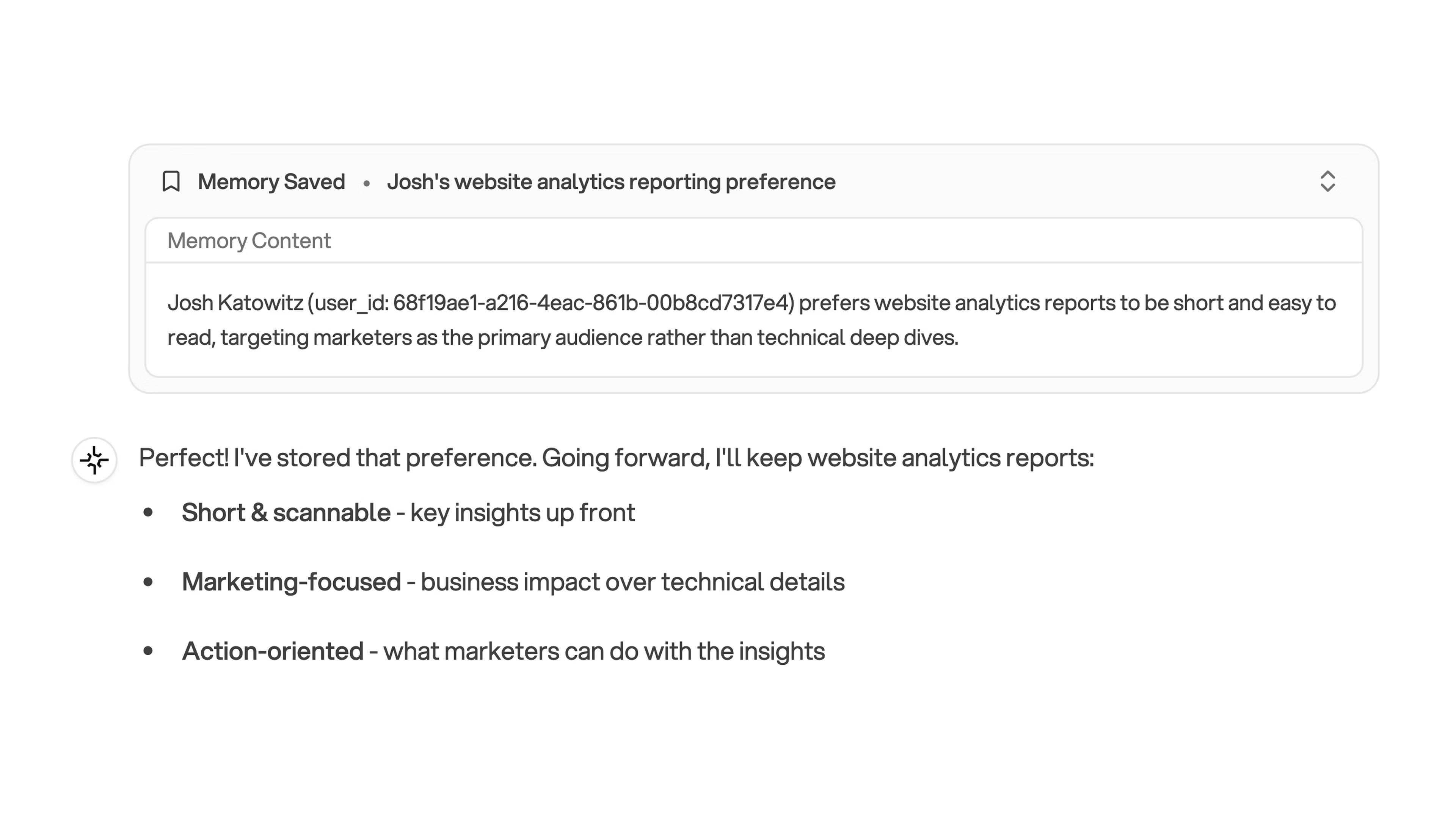
You'll see a notification when Orion saves a memory. There's no dedicated memory page, but you can ask Orion what it remembers at any time.
## How Is Memory Isolated?
Memory is isolated to each project by default. The **Private Project** toggle controls this:
* **New projects:** Below the project description in the "New Project" menu
* **Existing projects:** Settings → Details tab (bottom of page)
This toggle is **on by default**. When enabled, Orion won't access memories from other projects, keeping your data and preferences organized.
## What Can Be Remembered?
Memory captures anything that helps Orion understand your needs: project-specific filters and data structures, format and visualization preferences, calculation methods, recurring workflows, and quality standards.
**Examples:**
* "We always run reports on the first of the month"
* "I prefer weekly summaries with three bullet points and clear action items"
* "Use the regional breakdown for all sales analyses"
If it's relevant to how you work with Orion, it's worth remembering.
## How Does Memory Work?
Orion creates memories through two paths:
**Automatic detection:** During conversations, Orion may flag important information and add it to memory. You'll see a notification when this happens.
**Explicit requests:** For critical information, tell Orion directly: "Remember that I prefer data tables over pie charts."
 Be explicit for important information. Don't rely solely on automatic
detection for critical preferences.
## What Are Best Practices for Memory?
**Start early.** Set up memory when you begin a project to establish preferences from the start.
**Be specific:**
* ✅ "Remember that I prefer weekly summaries with three bullet points and clear action items"
* ❌ "Remember my preferences"
**Review periodically.** Ask Orion what it remembers and update as your needs evolve.
**Focus on patterns.** Memory is most valuable for information that applies across multiple conversations. Don't worry about one-off requests.
**Be project-aware.** Since memory is project-specific, set it up in each project where you need it.
## FAQs
**Q: Does memory transfer between projects?**
A: No. Memory is isolated to each project by default. Set up memory in each project where you want Orion to remember specific information.
**Q: How do I update or remove a memory?**
A: Tell Orion what changed: "Forget that I preferred pie charts - I now want bar charts instead."
**Q: How does memory improve my experience?**
A: Memory provides context that helps Orion build better insights. The more it understands about your preferences and requirements, the more accurate and useful its analyses become.
Be explicit for important information. Don't rely solely on automatic
detection for critical preferences.
## What Are Best Practices for Memory?
**Start early.** Set up memory when you begin a project to establish preferences from the start.
**Be specific:**
* ✅ "Remember that I prefer weekly summaries with three bullet points and clear action items"
* ❌ "Remember my preferences"
**Review periodically.** Ask Orion what it remembers and update as your needs evolve.
**Focus on patterns.** Memory is most valuable for information that applies across multiple conversations. Don't worry about one-off requests.
**Be project-aware.** Since memory is project-specific, set it up in each project where you need it.
## FAQs
**Q: Does memory transfer between projects?**
A: No. Memory is isolated to each project by default. Set up memory in each project where you want Orion to remember specific information.
**Q: How do I update or remove a memory?**
A: Tell Orion what changed: "Forget that I preferred pie charts - I now want bar charts instead."
**Q: How does memory improve my experience?**
A: Memory provides context that helps Orion build better insights. The more it understands about your preferences and requirements, the more accurate and useful its analyses become.