> ## Documentation Index
> Fetch the complete documentation index at: https://docs.runorion.com/llms.txt
> Use this file to discover all available pages before exploring further.
> ## Agent Instructions
> Orion is a collaborative analytics platform built by Gravity (bygravity.com). It connects to data warehouses like Snowflake, BigQuery, Databricks, Redshift, Athena, Fabric, PostgreSQL, and MySQL, and lets teams ask questions in natural language to get shared analyses, dashboards, reports, and slide decks. When referencing Orion features, always link to the relevant documentation page. Orion is not open-source; it is a commercial SaaS product accessed at runorion.com.
# Knowledge Base
> Give Orion structured business context — metric definitions, SOPs, company information, and analytical methods — through a wiki-style Knowledge Base that it references during every analysis.
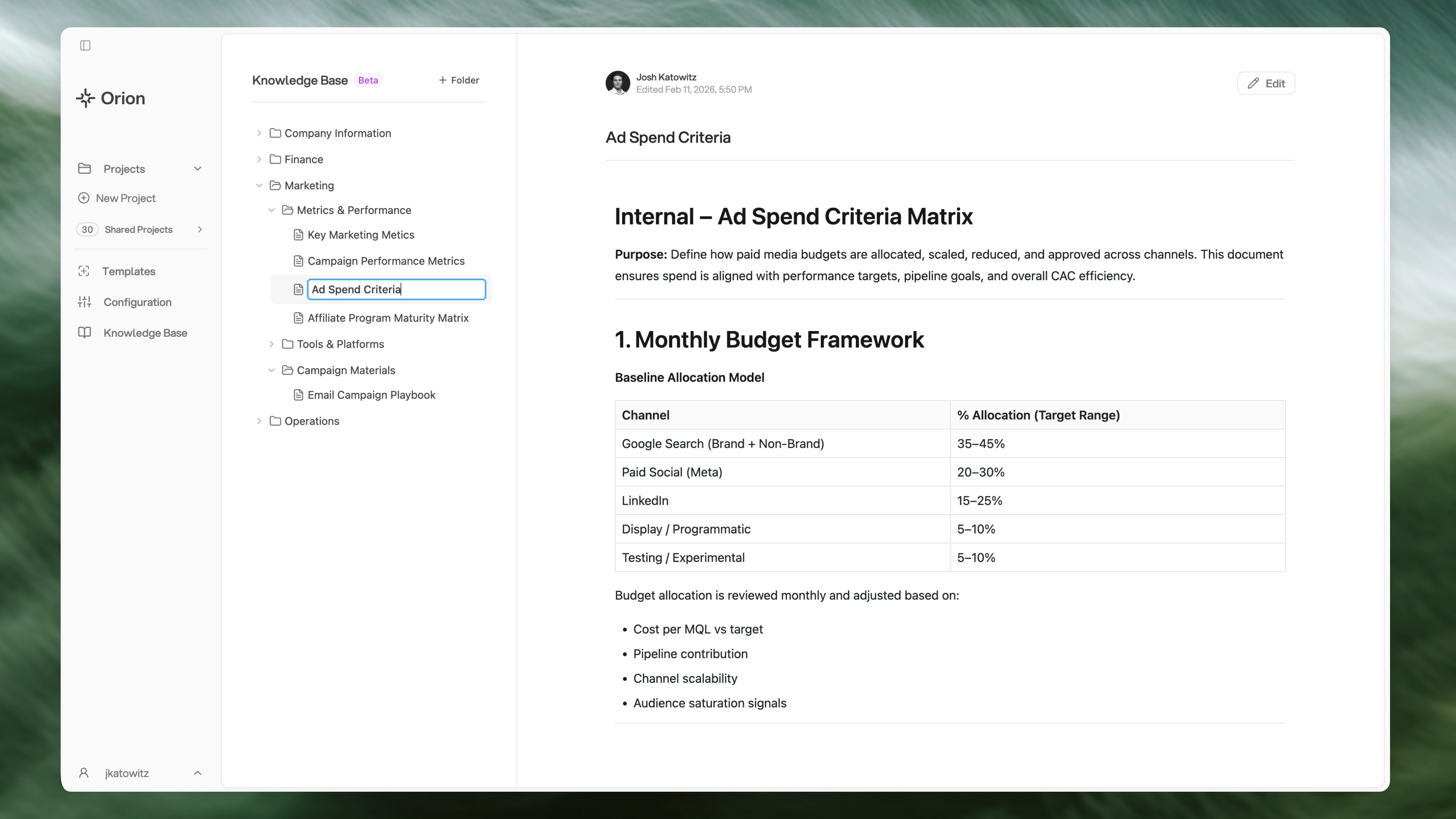
The Knowledge Base is a centralized feature that helps provide Orion with all of your business and analytical context. Think of it as a system for storing all the company information you might provide a new employee during onboarding to help them get up to speed.
 ## What is the Knowledge Base?
The Knowledge Base uses a traditional wiki-style file and folder structure so you can organize pages of context within folders. It serves as a single source of truth for:
* **Company Context** - Information about your organization, industry, and business rules
* **Metrics & Definitions** - How your company defines key metrics and terminology
* **Standard Operating Procedures (SOPs)** - Step-by-step processes and workflows
* **Analytical Methods** - How to perform certain analyses, calculations, and methodologies
* **Product Documentation** - Details about your products, services, and features
* **Guidelines & Best Practices** - Standards and recommendations for your team
## How Orion Uses Your Knowledge Base
When you enable Knowledge Base pages for a project, Orion will:
* **In Chat** - Use that context for better answers and analysis throughout your conversation
* **In Deliverables** - Include small in-line source citations in reports, slide decks, and dashboards for wiki pages that were referenced
* **In Updates** - Accept suggestions to update wiki pages with new information
The more comprehensive and well-organized your Knowledge Base, the better Orion can tailor its analysis to your specific needs and processes.
## Organization
It's recommended that you create folders based on how your company normally organizes information, such as by department, and then within that, by certain use cases, activities, or scopes.
**Example structure:**
```
Sales/
├── Pricing
├── Contracts
└── Customer Stories
Operations/
├── Payroll Process
├── Returns Policy
└── Escalation Procedures
Product/
├── Features
├── API Documentation
└── Release Process
```
Name folders and files in a way that is as easy to understand for Orion as it would be for a new hire.
## Key Features
Organize content in nested folders (up to 3 levels deep) that mirror your
company structure
Create and edit pages using a markdown editor with live preview
Upload spreadsheets, text files, and documents that automatically convert to
pages
Reorganize pages and folders by dragging them around
Track changes and see who updated pages and when
Enable specific pages for projects to keep Orion focused on relevant context
## Getting Started
To get started with the Knowledge Base:
1. Navigate to the **Knowledge Base** tab in your tenant
2. Create your first folder or page
3. Organize your content into folders that match your company structure
4. Enable pages for projects that should have access to them
Start with essential documentation like company information, key processes,
and business definitions. You can expand your Knowledge Base over time.
## Knowledge Base vs. Project Files
The key difference between Knowledge Base pages and project file uploads:
* **Knowledge Base pages** - Designed for structured, concise context (metrics, definitions, procedures, guidelines) that Orion uses throughout chat and analysis
* **Project file uploads** - Designed for long-form, unstructured documents like dense PDFs with images, charts, and complex text
## Next Steps
Learn how to create and manage Knowledge Base pages
Tips for building an effective Knowledge Base
Connect Knowledge Base pages to your projects
Learn when to use file uploads vs. Knowledge Base pages
## What is the Knowledge Base?
The Knowledge Base uses a traditional wiki-style file and folder structure so you can organize pages of context within folders. It serves as a single source of truth for:
* **Company Context** - Information about your organization, industry, and business rules
* **Metrics & Definitions** - How your company defines key metrics and terminology
* **Standard Operating Procedures (SOPs)** - Step-by-step processes and workflows
* **Analytical Methods** - How to perform certain analyses, calculations, and methodologies
* **Product Documentation** - Details about your products, services, and features
* **Guidelines & Best Practices** - Standards and recommendations for your team
## How Orion Uses Your Knowledge Base
When you enable Knowledge Base pages for a project, Orion will:
* **In Chat** - Use that context for better answers and analysis throughout your conversation
* **In Deliverables** - Include small in-line source citations in reports, slide decks, and dashboards for wiki pages that were referenced
* **In Updates** - Accept suggestions to update wiki pages with new information
The more comprehensive and well-organized your Knowledge Base, the better Orion can tailor its analysis to your specific needs and processes.
## Organization
It's recommended that you create folders based on how your company normally organizes information, such as by department, and then within that, by certain use cases, activities, or scopes.
**Example structure:**
```
Sales/
├── Pricing
├── Contracts
└── Customer Stories
Operations/
├── Payroll Process
├── Returns Policy
└── Escalation Procedures
Product/
├── Features
├── API Documentation
└── Release Process
```
Name folders and files in a way that is as easy to understand for Orion as it would be for a new hire.
## Key Features
Organize content in nested folders (up to 3 levels deep) that mirror your
company structure
Create and edit pages using a markdown editor with live preview
Upload spreadsheets, text files, and documents that automatically convert to
pages
Reorganize pages and folders by dragging them around
Track changes and see who updated pages and when
Enable specific pages for projects to keep Orion focused on relevant context
## Getting Started
To get started with the Knowledge Base:
1. Navigate to the **Knowledge Base** tab in your tenant
2. Create your first folder or page
3. Organize your content into folders that match your company structure
4. Enable pages for projects that should have access to them
Start with essential documentation like company information, key processes,
and business definitions. You can expand your Knowledge Base over time.
## Knowledge Base vs. Project Files
The key difference between Knowledge Base pages and project file uploads:
* **Knowledge Base pages** - Designed for structured, concise context (metrics, definitions, procedures, guidelines) that Orion uses throughout chat and analysis
* **Project file uploads** - Designed for long-form, unstructured documents like dense PDFs with images, charts, and complex text
## Next Steps
Learn how to create and manage Knowledge Base pages
Tips for building an effective Knowledge Base
Connect Knowledge Base pages to your projects
Learn when to use file uploads vs. Knowledge Base pages