

Accessing User Management
User Management is available to tenant Admins. To access it:- Click your username in the bottom-left corner
- Select Manage Users
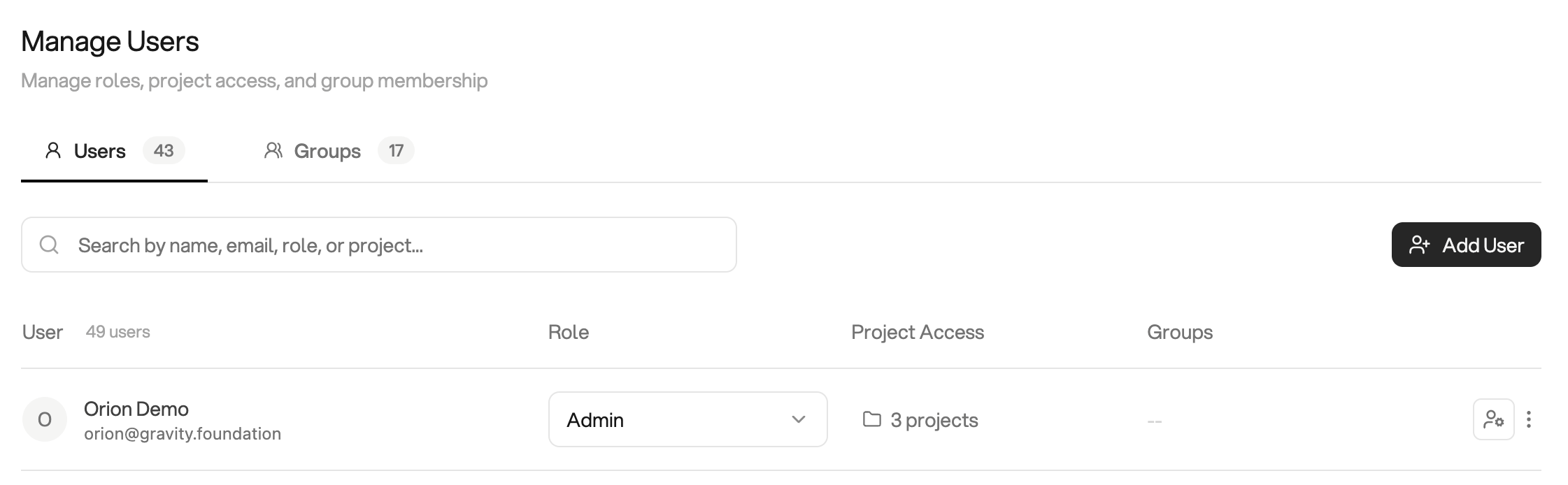
Tenant users and their access
Inviting New Users
To invite a new team member to your Orion tenant:- Navigate to Settings → Manage Users
- From the Users tab, click Invite user
- Enter the new user’s email address
- Choose the appropriate role
- Send the invitation
Tenant Roles
Every user has a tenant role that defines their baseline permissions across the entire tenant.Admin
Full control of the tenant. Can invite users, create and manage groups,
connect data sources, and assign users to projects.
Analyst
Can do just about anything within a project: chat, run analyses, and share
projects. Cannot add existing users to other projects directly.
Viewer
Read-only access to approved projects and content. Cannot run analyses or
make changes.
Tenant roles vs. group roles
If you use Groups, each user also has a group role in every group they belong to (Group Admin, Group Analyst, or Group Viewer). Group roles are independent of tenant roles and only apply inside that group, so a tenant Viewer can still be a Group Admin in a group they manage. For a side-by-side comparison of all six roles, see Groups → Roles at a Glance.User Management Tasks
Administrators can:- Invite new users: add team members to the tenant
- Assign tenant roles: control each user’s baseline permissions
- Manage group membership: see which groups a user belongs to and their role in each
- Modify permissions: update existing user roles
- Deactivate users: remove user access while preserving history
- Remove users: completely delete user accounts
- Sudo as a user: temporarily act as another user to troubleshoot issues from their point of view